


下载安装
首先官方链接放在这里
https://developer.nvidia.com/cuda-downloads
选择如下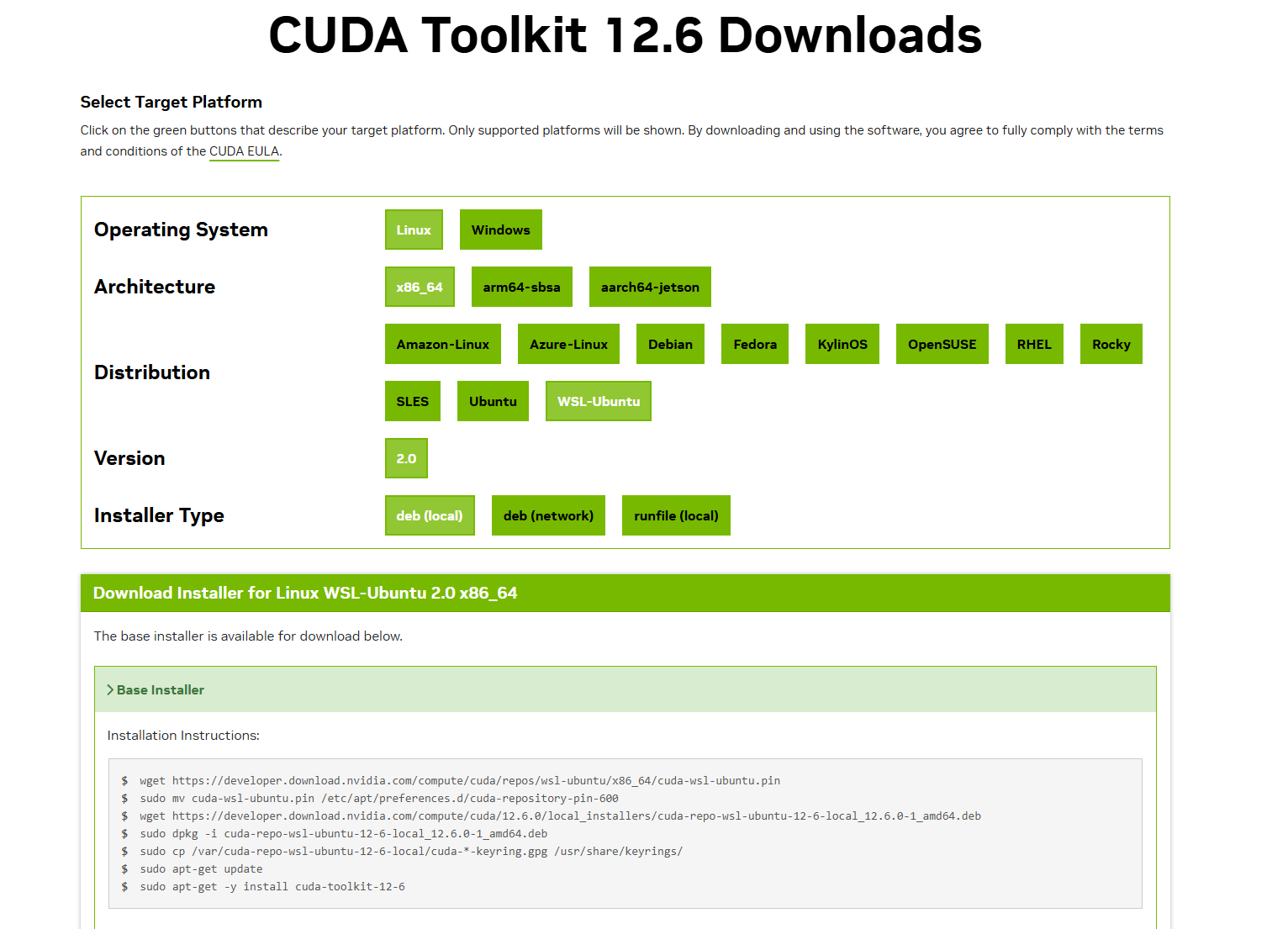
按照官方提示安装
wget https://developer.download.nvidia.com/compute/cuda/repos/wsl-ubuntu/x86_64/cuda-wsl-ubuntu.pin
sudo mv cuda-wsl-ubuntu.pin /etc/apt/preferences.d/cuda-repository-pin-600
wget https://developer.download.nvidia.com/compute/cuda/12.6.0/local_installers/cuda-repo-wsl-ubuntu-12-6-local_12.6.0-1_amd64.deb
sudo dpkg -i cuda-repo-wsl-ubuntu-12-6-local_12.6.0-1_amd64.deb
sudo cp /var/cuda-repo-wsl-ubuntu-12-6-local/cuda-*-keyring.gpg /usr/share/keyrings/
sudo apt-get update
sudo apt-get -y install cuda-toolkit-12-6
配置环境
添加环境变量vim .bashrc
export LD_LIBRARY_PATH=$LD_LIBRARY_PATH:/usr/local/cuda-12.6/lib64
export PATH=$PATH:/usr/local/cuda-12.6/bin
export CUDA_HOME=$CUDA_HOME:/usr/local/cuda-12.6
export PATH=/usr/local/cuda/bin:$PATH
重点来了!在运行 nvidia-smi 会报错如下所示
yanchang@DESKTOP-8T67OEJ:~$ nvidia-smi
Command 'nvidia-smi' not found, but can be installed with:
sudo apt install nvidia-utils-470         # version 470.256.02-0ubuntu0.24.04.1, or
sudo apt install nvidia-utils-470-server  # version 470.256.02-0ubuntu0.24.04.1
sudo apt install nvidia-utils-535         # version 535.274.02-0ubuntu0.24.04.2
sudo apt install nvidia-utils-535-server  # version 535.274.02-0ubuntu0.24.04.2
sudo apt install nvidia-utils-565-server  # version 565.57.01-0ubuntu0.24.04.3
sudo apt install nvidia-utils-570         # version 570.195.03-0ubuntu0.24.04.1
sudo apt install nvidia-utils-570-server  # version 570.195.03-0ubuntu0.24.04.2
sudo apt install nvidia-utils-580         # version 580.95.05-0ubuntu0.24.04.2
sudo apt install nvidia-utils-580-server  # version 580.95.05-0ubuntu0.24.04.2
sudo apt install nvidia-utils-525         # version 525.147.05-0ubuntu1
sudo apt install nvidia-utils-525-server  # version 525.147.05-0ubuntu1
sudo apt install nvidia-utils-550-server # version 550.163.01-0ubuntu0.24.04.1我们在windwos下输入nvidia-smi是可以运行的,同样其实在WSL中也可以使用nvidia-smi命令,不过WSL的nvidia-smi在 /usr/lib/wsl/lib/目录,故我们只需要对/usr/lib/wsl/lib/nvidia-smi进行软链接到/usr/bin/:
sudo ln -s /usr/lib/wsl/lib/nvidia-smi /usr/bin/nvidia-smi然后就可以了
yanchang@DESKTOP-8T67OEJ:~$ nvidia-smi
Mon Nov 10 22:06:26 2025
+-----------------------------------------------------------------------------------------+
| NVIDIA-SMI 560.35.02              Driver Version: 560.94         CUDA Version: 12.6     |
|-----------------------------------------+------------------------+----------------------+
| GPU  Name                 Persistence-M | Bus-Id          Disp.A | Volatile Uncorr. ECC |
| Fan  Temp   Perf          Pwr:Usage/Cap |           Memory-Usage | GPU-Util  Compute M. |
|                                         |                        |               MIG M. |
|=========================================+========================+======================|
|   0  NVIDIA GeForce RTX 4090        On  |   00000000:01:00.0  On |                  Off |
| 30%   41C    P3             82W /  450W |    6207MiB /  24564MiB |     67%      Default |
|                                         |                        |                  N/A |
+-----------------------------------------+------------------------+----------------------+

+-----------------------------------------------------------------------------------------+
| Processes:                                                                              |
|  GPU   GI   CI        PID   Type   Process name                              GPU Memory |
|        ID   ID                                                               Usage      |
|=========================================================================================|
|  No running processes found                                                             |
+-----------------------------------------------------------------------------------------+
然后只需要检查一下环境没有问题就可以正常使用了
yanchang@DESKTOP-8T67OEJ:~$ nvidia-smi
Mon Nov 10 22:06:26 2025
+-----------------------------------------------------------------------------------------+
| NVIDIA-SMI 560.35.02              Driver Version: 560.94         CUDA Version: 12.6     |
|-----------------------------------------+------------------------+----------------------+
| GPU  Name                 Persistence-M | Bus-Id          Disp.A | Volatile Uncorr. ECC |
| Fan  Temp   Perf          Pwr:Usage/Cap |           Memory-Usage | GPU-Util  Compute M. |
|                                         |                        |               MIG M. |
|=========================================+========================+======================|
|   0  NVIDIA GeForce RTX 4090        On  |   00000000:01:00.0  On |                  Off |
| 30%   41C    P3             82W /  450W |    6207MiB /  24564MiB |     67%      Default |
|                                         |                        |                  N/A |
+-----------------------------------------+------------------------+----------------------+

+-----------------------------------------------------------------------------------------+
| Processes:                                                                              |
|  GPU   GI   CI        PID   Type   Process name                              GPU Memory |
|        ID   ID                                                               Usage      |
|=========================================================================================|
|  No running processes found                                                             |
+-----------------------------------------------------------------------------------------+
yanchang@DESKTOP-8T67OEJ:~$ nvcc --version
nvcc: NVIDIA (R) Cuda compiler driver
Copyright (c) 2005-2024 NVIDIA Corporation
Built on Fri_Jun_14_16:34:21_PDT_2024
Cuda compilation tools, release 12.6, V12.6.20
Build cuda_12.6.r12.6/compiler.34431801_0